


Is Someone Spying on Your Cell Phone? 10 Ways to Tell & How to Stop Them. Learn simple signs and easy steps to stop phone tracking and stay safe. Visit: Inezabusiness.com

Is Someone Spying on Your Cell Phone? 10 Ways to Tell & How to Stop Them
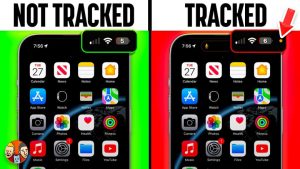
Have you ever felt like your phone is acting strange? Many people ask, “Is someone spying on my cell phone?” Today, our phones hold everything—photos, messages, passwords, and even our private chats. So it’s important to know the signs of spying and how to protect yourself.
This guide is easy to read, simple to understand, and helps you stay safe.
- Your Phone Gets Hot for No Reason
If your phone feels warm when you are not using it, something may be running in the background. Spy apps can make your phone heat up because they never stop working.
- Battery Runs Out Quickly
A battery that dies fast can be a sign that someone is spying on your cell phone. Spy apps use your power to collect and send information.
- Your Data Finishes Too Fast
When your data usage suddenly increases, it may mean your phone is sending information to someone else without your knowledge.
- You See Apps You Never Downloaded
If you find apps you don’t recognize, be careful. Some spy apps hide under strange names.
- Your Phone Restarts or Freezes
A phone that keeps restarting, freezing, or running slowly might have a spy tool inside it.
- You Receive Weird Text Messages
If you get messages with random numbers, symbols, or codes, they may be commands sent to spy software.
- Strange Sounds During Calls
Hearing beeps, clicks, or echoes during calls can mean the call is being recorded or listened to.
- Your Phone Settings Change on Their Own
If your Bluetooth, Wi-Fi, or location turns on by itself, someone may be trying to track you.
- Websites Open by Themselves
A phone that opens random pages or pop-ups may have been hacked or infected.
- You Get Alerts About Unknown Logins
Seeing messages like “New login from another device” is a warning sign that your phone or accounts may be compromised.
How to Stop Someone From Spying on Your Cell Phone
- Change All Your Passwords
Use strong passwords that are hard to guess. Avoid using the same password for everything.
- Update Your Phone
Software updates help protect your phone from hackers and spying apps.
- Remove Any Strange Apps
Check all your apps one by one. Delete anything you don’t know or trust.
- Use a Good Security App
Apps like Avast, Malwarebytes, or Bitdefender can scan your phone and remove spy software.
- Turn Off Location When You Don’t Need It
This keeps others from knowing where you are all the time.
- Do a Factory Reset
If things look very bad, save your important files and reset your phone. This clears everything, including hidden spy apps.
- Lock Your Phone
Use a PIN, pattern, fingerprint, or face unlock so no one can access your phone without your permission.
When You Should Get Professional Help
If the problem continues or you feel unsafe, talk to a phone expert or a cybersecurity professional. They can check your phone and remove any spying tools.
Helpful External Links (Real & Trusted)
- CISA – Cybersecurity & Infrastructure Security
https://www.cisa.gov - National Cybersecurity Alliance
https://staysafeonline.org - Malwarebytes Mobile Security Guide
https://www.malwarebytes.com/mobile
Visit: Inezabusiness.com


















Today, our phones hold everything—photos, messages, passwords, and even our private chats. So it’s important to know the signs of spying and how to protect yourself.https://inezabusiness.com/is-someone-spying-on-your-cell-phone-10-ways-to-tell-how-to-stop-them/
https://shorturl.fm/2w14y
https://shorturl.fm/uZyNN
https://shorturl.fm/WOr7u
https://shorturl.fm/lt9Z0