

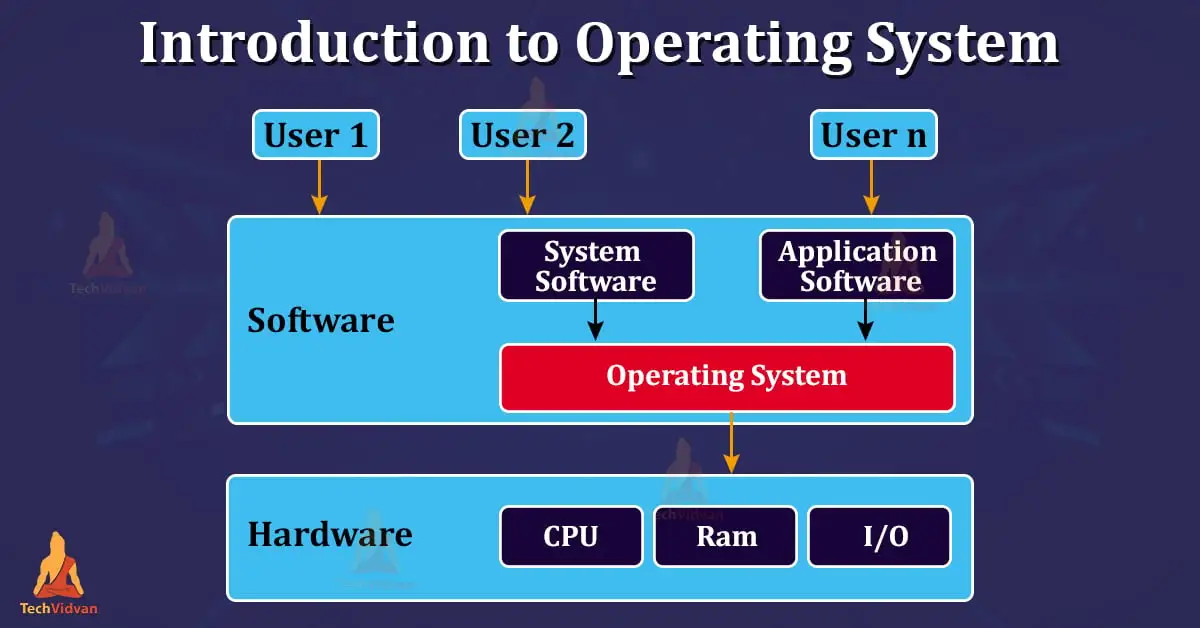
Simple introduction to operating system for beginners. Learn what an OS is, how it works, and why every device needs it.
Introduction to Operating System
Let’s be real — computers can feel confusing sometimes. There are so many buttons, apps, and tools that it’s hard to know what’s actually happening behind the scenes. But here’s the cool part: one big program makes all of it work smoothly. That program is called an operating system.
In this friendly introduction to operating system, I’ll explain everything in simple words — no tech headaches, I promise.
Think about your computer or phone like a big house. The operating system (OS) is the manager of that house. It opens doors, turns on lights, organizes rooms, and makes sure everything works correctly.
If you tap an app, the OS opens it.
If you save a picture, the OS stores it.
If you type on a keyboard, the OS reads it.
Without an operating system, your device wouldn’t even know how to start. It would be like a car with no engine.
Some common operating systems you already know:
- Windows
- macOS
- Android
- iOS
- Linux
See? You’ve been using them all along.
Why Do We Need an Operating System?
You might be thinking, “Okay, but why is an OS so important?”
Well, imagine trying to play music, open YouTube, or write a document by typing long computer codes. That would be a nightmare.
This introduction to operating system is here to show you why the OS is a lifesaver:
- It Makes Everything Easy
You click. It opens.
You tap. It responds.
All thanks to the OS.
- It Keeps Your Files Safe
Your photos, songs, videos, and school documents are all neatly stored and protected by the OS.
- It Protects Your Device
The OS blocks harmful apps, controls permissions, and prevents strangers from accessing your stuff.
- It Helps All Parts of the Computer Work Together
The screen, mouse, keyboard, memory — all of them talk through the OS.
It’s like the translator for the whole computer.
How Does an Operating System Work?
Let’s break it down without going full “computer science mode.”
Manages Apps
Ever opened many apps at once? Music playing, browser open, chatting with friends?
The OS is the one making sure they don’t fight for space.
Manages Memory (RAM)
Your device has limited memory. The OS decides which app gets how much space so your phone doesn’t freeze like ice.
Manages Hardware
When you touch the screen, take a photo, or press a button — the OS carries your message to the right place.
Controls Users
Passwords, face unlock, accounts — all handled by the OS to keep your device safe.
Types of Operating Systems
Here’s a simple breakdown (because the words can sound scary):
- Single-User OS
Used at home on personal computers.
- Multi-User OS
Used in big companies where many people share one system.
- Mobile OS
Android and iOS — the kings of smartphones.
- Network OS
Used in offices or schools where computers are connected together.
Final Thoughts
And that’s your friendly, easy-going introduction to operating system!
Now you understand what an OS is, why it matters, and how it helps your device work like magic.
The OS is your quiet hero. You don’t see it, but it’s always working for you — every tap, every click, every second.
If you want more simple tech guides like this, I’m right here for you. 😊
Helpful External Links (Real & Verified)
- https://www.techtarget.com/searchdatacenter/definition/operating-system
- https://www.computerhope.com/jargon/o/os.htm
- https://www.geeksforgeeks.org/introduction-of-operating-system-set-1/

















Simple introduction to operating system for beginners. Learn what an OS is, how it works, and why every device needs it.inezabusiness.com
https://shorturl.fm/wHPzN
https://shorturl.fm/9c4ic
https://shorturl.fm/IUGt2
https://shorturl.fm/sH57e
https://shorturl.fm/mMODB
https://shorturl.fm/ZVjJs
https://shorturl.fm/GcK6G
https://shorturl.fm/0gXGq