
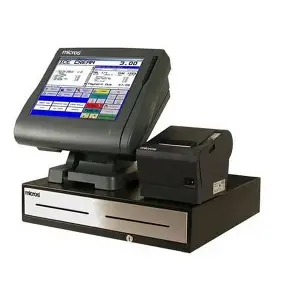
What Is an Electronic Billing Machine (EBM)?
An Electronic Billing Machine (EBM) is a system used to issue official receipts or invoices that include tax details like VAT. In Rwanda, EBMs are regulated by the Rwanda Revenue Authority (RRA) to ensure tax compliance. Businesses must use them to record and report sales.
Types of EBMs in Rwanda
Rwanda offers different types of EBMs based on the size and type of business:
1. Software-Based EBM (EBM 2)
-
Works on smartphones, tablets, laptops, or desktops.
-
Requires internet access to transmit invoice data to RRA automatically.
-
Recommended for medium to large businesses or those with higher invoice volumes.
2. Mobile EBM App
-
Designed for small businesses.
-
Can be installed on smartphones with Android 8.1 or higher.
-
Used to issue invoices on the go.
3. Online EBM Portal
-
Suitable for professionals or businesses that issue very few invoices.
-
Accessed through a web browser.
-
No installation required.
Devices Compatible with EBM
-
Desktops and laptops using Windows 10 or newer.
-
Android smartphones and tablets (version 8.1 and above).
-
macOS and iOS devices are not supported.
Datecs EBM (Example: Datecs EP-700)
Datecs is a well-known brand that manufactures fiscal printers compatible with EBM systems in various countries, including Rwanda.
Key Features:
-
Thermal receipt printer with high-speed printing.
-
Compatible with USB, LAN, and serial connections.
-
Has an auto paper cutter for efficient retail use.
-
Supports connection to tax authority systems for automated reporting.
Best For:
-
Retail shops
-
Supermarkets
-
Pharmacies
-
Any business that prints multiple invoices per day
Incotex EBM
Incotex is another brand that provides EBM-certified devices, although it is less widely documented.
Known Characteristics:
-
Designed to handle fiscal data securely.
-
Includes built-in memory for storing transaction history.
-
Can work as a standalone device or be integrated with other POS systems.
Common Use Cases:
-
Wholesale businesses
-
Mini markets
-
General merchandise shops
🧾 How to Use Any EBM (Standard Process)
1: Power On the Device
-
Plug it into a power source and turn it on.
2: Log In (If Needed)
-
Enter your user ID or PIN if the system requires authentication.
3: Enter Transaction Details
-
Add product or service name.
-
Specify quantity and unit price.
-
Confirm applicable tax (e.g., 18% VAT).
4: Confirm and Issue Invoice
-
Review the details on screen.
-
Press “Issue” or “Print” to generate the invoice.
-
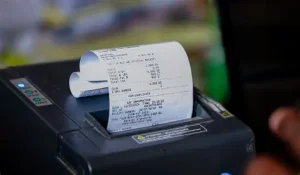
The printed invoice will include the business name, tax number, invoice number, total amount, and a QR code or control number.
5: Send Data to RRA
-
Smart EBMs send invoice data automatically through the internet.
-
If offline, some machines allow later upload using a flash drive or network sync.
📋 Features of a Valid EBM Invoice
-
Registered business name and TIN
-
Unique invoice number
-
Date and time of transaction
-
Itemized list of goods or services
-
VAT or other applicable taxes
-
Total payable amount
-
QR code or control number for verification
⚠️ Common Errors and Solutions
| Problem | Solution |
|---|---|
| Paper jam | Open the printer and reload paper |
| Can’t connect to server | Check internet or restart device |
| Invoice not printing | Verify printer is correctly set up |
| Wrong date/time | Adjust settings in the device menu |
Things to Consider When Choosing an EBM
| Criteria | Why It Matters |
|---|---|
| Certification | Only certified devices are allowed |
| Connection options | Internet is needed for Smart EBMs |
| Speed and durability | Important for high-volume businesses |
| Technical support | Helps resolve issues quickly |
| Price and maintenance | Affects long-term business costs |














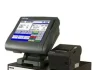

 is a system used to issue official receipts or invoices that include tax details like VAT.)
%2c+How+To+Use+It%3f&FORM=IRPRST&ck=86B004A72A5379813DEC230E57F7B967&selectedIndex=2&itb=0)
amakuruyanyu
Amakuru nimeza Ephrem we
Amakuru nimeza Mr.Ephrem
Good Kbs!!!!!!!!!!!!!
nice brother thank you for your support
This website can help us to improve uor own skills
amakuru
nice to know you teacher
thas you website is good
https://inezabusiness.com/gadget-ogling-amazon-on-fire-virtual-reality-true-nature-and-energy-relief/
An Electronic Billing Machine (EBM) is a system used to issue official receipts or invoices that include tax details like VAT. In Rwanda, EBMs are regulated by the Rwanda Revenue Authority (RRA) to ensure tax compliance. Businesses must use them to record and report sales.